


October 2026


In This Issue

October Podcast:
Print-Friendly
Version:

Letter from the President
Reflecting on the Year
The Momentum Takes Shape
Dear CF Data Community,
Throughout this year’s letters, I’ve returned to a common theme: momentum. As we share our final newsletter of the year, I’m pleased to see that momentum taking shape through the next generation of STRUCTURECloud—and through your participation in what comes next.
Our recent User Group Conference was a tremendous opportunity to connect, share ideas, and demonstrate the next generation of STRUCTURECloud. Thank you to everyone who joined us. Your enthusiasm, thoughtful questions, and feedback made the event a success and reinforced how valuable these conversations are to our continued development.

Kenny stands in Times Square as his photo and the CF Data logo light up the Nasdaq Tower.
At the conference, we highlighted several key advancements: a fully web-based platform, a revamped reporting engine and interactive dashboard displays, a full audit trail, a new workflow engine, and updated mobile apps. We also shared our AI roadmap and integration plans, offering a look at how we intend to continue expanding STRUCTURECloud’s capabilities. Together, these developments reflect our commitment to making the system more accessible, giving you better visibility into your business, and helping your teams work more efficiently.

That excitement is carrying into our sandbox rollout, with customers onboarding as we speak. Demand has been strong, so we are providing access in stages to let our team support each group as they get started. If you are still waiting for access, we appreciate your patience as we work to bring everyone on board.
As a reminder, the sandbox is your opportunity to get acquainted with the new version, explore the interface, and become comfortable with how your team’s workflows will take shape. It is an environment for learning and exploration, rather than day-to-day business operations. We encourage you to spend time in it, ask questions, and share your experience. We welcome all feedback—from the features you’re excited about to the areas where you see room for improvement.Looking ahead, we'll keep turning this momentum into meaningful progress for your business. Your input helps us understand what matters most and guides our work as we move forward.
Thank you for your continued trust, partnership, and support throughout the year. On behalf of everyone at CF Data Systems, I wish you and your teams a strong finish to the year and a happy, healthy holiday season.
Warm regards,
Kenny Akinnagbe
Kenny Akinnagbe
President, CF Data Systems

CF Data President Kenny Akinnagbe and Chief Technology Officer Chris Ryan recently attended OpenAI DevDay 2026 in San Francisco, marking CF Data’s second consecutive year at the conference.
They made the most of their time exploring developments in artificial intelligence and returned with fresh ideas for how AI can help improve our software and better serve our customers.
Their participation reflects CF Data’s continued commitment to thoughtful innovation and the future of construction technology.
News from the Office
Trade Show Visits
Starnet Fall Membership Meeting
The CF Data team will be attending the 2026 Starnet Fall Membership Meeting, taking place October 22–24 at La Cantera Resort in San Antonio, Texas.
We look forward to connecting with our customers, catching up with familiar faces, and meeting new members of the Starnet community. It’s a great opportunity to share ideas, hear about your business, and discuss how STRUCTURE can support your team.
If you’re attending, please be sure to say hello! Whether you have a question, feedback to share, or simply want to catch up, we’d love to spend some time with you.
We look forward to seeing you in San Antonio!

As a Starnet Preferred Vendor, CF Data Systems is proud to congratulate our customers who were among the winners of the 2026 Starnet Design Awards.
Capital Carpet & Flooring Specialists, M. Frank Higgins & Co., Inc., and Ruggieri Brothers each earned Gold Awards in their respective categories.
Congratulations to all three on this well-deserved recognition!

Jaymi and Theresa between sessions at the 2026 User Group Conference.
Meet CF Data at the STA Tech Expo in NYC
The CF Data team will attend the Subcontractors Trade Association’s STA Tech Expo on October 15, joining subcontractors, owners, developers, general contractors, and financial partners from across New York City’s construction industry.
With working demonstrations of technology used on job sites and candid panel discussions about its successes and challenges, the expo offers an opportunity to explore what’s next for construction.
Our managing partner, John Rapaport of Component Assembly Systems, will moderate the panel “Using AI on the Jobsite,” bringing the conversation to one of the industry’s most talked-about technologies.
If you’re attending, be sure to say hello! We’d love to hear about your projects and discuss how STRUCTURE can help your team manage the work ahead.

Kenny is presented with a custom Lumber-branded skateboard as a token of appreciation from Lumber's co-founder, Lou Perez.

Erin (center) happily using her time at the User Group Conference to connect with customers.
CF Data will be closed on the following days:
Support will not be available as we observe:
-
Thursday, November 26 & Friday November 27 - Thanksgiving
-
Friday, December 11 - CF Data Holiday Party
-
Friday, December 25 - Christmas
-
Friday, January 1 - New Year's Day

Support News
Time for a Little Housekeeping?
Purge Older Reports in STRUCTURE Using RLP

Reports can accumulate over time, taking up storage space and making it harder to find what you need in your Report List. Periodically purging older report files helps keep that list organized, frees up storage space, and may help your system run faster—particularly when a large volume of files has built up.
STRUCTURE’s RLP – Report Purge program lets you delete selected files from the Report List, which you access through the Report Lists icon on your toolbar. You can choose specific users, file types, and a cutoff date to control what gets removed.
To get started, select RLP – Report Purge from the Printing menu, then:
-
Choose the users. Select an individual user using the search arrow, or select All Users.
-
Choose the file types. Select Reports, Archived Reports, PDF Files created in STRUCTURE, Excel Spreadsheets created in STRUCTURE, or all types.
-
Set the cutoff date. Enter the date through which you want files purged, or use the search arrow to choose a date from the calendar.
STRUCTURE will not delete any report that is less than 30 days old.
Before proceeding, review your selections and make sure any files you need to retain have been saved elsewhere according to your company’s recordkeeping policies. When you’re ready, click PURGE FILES!
Remember, RLP purges report files from the Report List—it does not purge the underlying accounting transactions. Consider making a report review part of your regular STRUCTURE housekeeping routine.

The swag tote bags distributed at the User Group Conference this year seemed to generate lots of smiles.

Our resident cowboy, Lou Escolas, was recognized for his 30 years of dedication to the CF Data development team.
Year End Webinars
Get Ready for Year End:
Webinars Will Be Available Online

Our Year End Payroll and Year End Payable webinars, along with written instructions, will be available on the CF Data Support website by mid-December.
This year, we’re offering prerecorded webinars to accommodate our customers’ varied schedules and help ensure everyone can access the important instructions without the risk of missing information because of technical issues during a live session.
Watch at a time that works for you, pause to take notes, and revisit specific steps whenever you need a refresher. The accompanying written instructions provide an additional reference as you work through your year-end procedures.
We encourage you to review these resources before beginning your year-end processing and share them with the members of your team responsible for payroll and accounts payable.
Visit www.cfdatasupport.com/year-end to access the webinars and instructions.
If you have questions as you prepare, please contact CF Data Support. We’re here to help!

Crosby Brownlie of Rochester, NY receives the STRUCTURE Scale Leader Award.

Ideal Electric of Peabody, MA is recognized for being a Cloud pioneer.
Year End News
Important 1099 Changes
New Reporting Threshold
Beginning with tax year 2026, the federal reporting threshold for Form 1099-NEC and Form 1099-MISC has increased from $600 to $2,000 per payee.
This threshold is stored in a control file question in STRUCTURE. We will be releasing an update that will make this change for you. If you would like to be proactive and make the change now, please go to control file question VCQ/#07000 and change the answer to 02000.

Electronic Filing Changes
Starting January 1st 2027, IRIS will be the only electronic filing system for information returns.
The FIRE system is officially being retired.
If you haven’t already switched over to IRIS, now is the time to apply for a Transmitter Control Code (TCC) with them.
Per the IRS, it may take up to 45 days for processing. So the sooner you apply, the better.
To apply for a TCC with IRIS go to:
https://www.irs.gov/filing/e-file-information-returns-with-iris
For more information on the retirement of FIRE:
https://www.irs.gov/e-file-providers/filing-information-returns-electronically-fire
Qualified Overtime Reporting

Handling the Federal Tax Deduction in STRUCTURE
As we prepare for 2026 year-end reporting, we want to explain how STRUCTURE will handle qualified overtime under the new federal tax deduction. The deduction applies to a specific portion of eligible overtime pay, so the amount reported for this purpose may be less than the employee’s full overtime wages.
Qualified overtime is based on the Fair Labor Standards Act (FLSA). For most eligible employees, the overtime must be required after more than 40 hours are actually worked in a workweek. Paid time off does not count toward those 40 hours, and an OT pay code alone does not make an hour qualify. The deductible amount is generally the required half-time, which is called the premium amount (0.5 × the regular rate). For example, if an employee’s regular rate is $20 per hour and they receive $30 per hour for qualifying overtime hours, the premium is $10 per hour. STRUCTURE will report $10, rather than the full $30 of overtime wages, in 2026 W-2 Box 12 with Code TT.
The EOB report will still be available to show the calculation in detail and provide backup for your records. Employees with questions about claiming the deduction should consult the IRS or a tax professional.
IRS References
Qualified overtime Q&A: irs.gov/newsroom/questions-and-answers-about-the-new-deduction-for-qualified-overtime-compensation2026
W-2 instructions: irs.gov/instructions/iw2w3

Simplify Your Year-End and Payroll Tax Filing
Electronic W-2 filing through the EWS and EXS programs are offered at no-cost in STRUCTURE for the following states and the District of Columbia: AL, AZ, CA, CO, CT, DC, DE, GA, IA, IL, IN, KS, MA, MD, ME, NJ, OH, OK, OR, PA, RI, SC, UT, VA, VT, WI
We also support quarterly payroll filings for the following states. A premium applies to this service: AL, CA, CT, MA, NH, NJ, NV, NY, PA
Don’t see your state listed? Contact Theresa at theresa@cfdatasystems.com to discuss available options.
For help using the EWS program in STRUCTURE, please contact Support.
Additional Year-End and Tax Season Options
Special programs are also available to help you:
-
Print 4-up W-2 forms
-
File state 1099s electronically
-
Combine office and field payroll for quarterly reports
Take advantage of these options to simplify your reporting, save time, and make year-end filing more cost-effective.
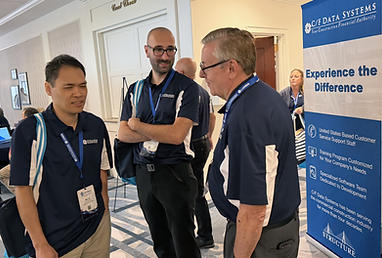
Wai, Jonathan, and Bob from CF Data's development team ponder lunch.
Tax Forms

Nicole Viskup from Douglas Floor Covering, one of the winners of the User Group Conference scavenger hunt.
Important Information About Your W2 and 1099 Forms
You will soon receive a packet from C/F Data Systems Forms containing an order sheet for your W2 and 1099 forms.
If you do not receive this packet, please contact C/F Data Systems Forms at (978) 851-0088 for assistance.
How Many W2s and 1099s Should You Order?
To determine how many forms you need:
-
Run ETW for your W2s
-
Run VTT for your 1099s
We recommend purchasing extra forms to allow for lineup and test printing as needed.
The 1095-C will print on plain paper and does not need a special form.
Year-End Timeline
2026 Payroll Year-End Timeline
Use this timeline to plan your year-end payroll tasks and prepare for 2027.
October 2026
W-2 order forms will be mailed in the coming weeks. If you do not receive yours, call C/F Data Forms at (978) 851-0088.
Review the year-end tips in this newsletter, including “How Many W-2s and 1099s Should I Order?”
By Mid-November 2026
-
Run ETW to determine how many W-2 forms you will need and VTT to determine how many 1099 forms you will need.
-
Order your W-2 and 1099 forms using the C/F Data Systems Forms order form.
-
Review the payroll and 1099 year-end procedures in the Year End section of cfdatasupport.com.
All year-end documents will be updated by December 1, 2026.
December 2026
-
Follow the “Preparing for W-2s Summary Checklist” included in this newsletter.
-
Include applicable insurance or vehicle allowance amounts in employees’ weekly checks in early December.
-
Print employee bonus checks before processing the final payroll week of 2026.
Before Processing the First Payroll of 2027
-
Complete all required year-end procedures on the “Preparing for W-2s Summary Checklist.”
-
Run ENI – Inquiry and review the Earnings information for your own employee record. All earnings amounts should be zero.
First Week of January 2027
CF Data will distribute the 2027 tax changes. Follow all accompanying instructions.
By the End of January 2027
Print your W-2 and 1099 forms, allowing enough time to distribute and file them by the applicable deadlines.
The federal deadline to furnish and file 2026 W-2s and 1099-NECs is Monday, February 1, 2027, because January 31 falls on a Sunday. Other 1099 deadlines vary by form and filing method.
Reminder: Form 1095-C is processed independently of W-2s and may be started at any point during the year-end process.
Preparing for W2's
Preparing for 2026 W-2s: Year-End Checklist for Separate Office and Regular Payroll Companies
This checklist summarizes the year-end steps required when you maintain a separate company for Office Payroll. Some steps apply to both payroll companies, while others apply to the Office Payroll company only.
Before you begin, read the complete instructions in the Year End section of cfdatasupport.com. Use those detailed procedures alongside this checklist, and mark each step as you complete it.
During December 2026, Before the Final Payroll Week
-
Run ETW to determine how many W-2 forms to order.
-
In both the Office and Regular Payroll companies, include applicable insurance and vehicle allowance amounts in employees’ weekly checks.
-
Issue employee bonus checks in both companies, as applicable.
Important: Create your 2026 W-2 records and run EYU before processing any 2027 payroll checks.
Before the First Payroll of 2027: Both Companies
Complete the following in both the Office and Regular Payroll companies:
-
EWU: Run the reports and update the final payroll week of 2026.
-
EMU: Run the reports and update the final month of 2026.
-
ECR: Run the 401(k) Contribution Report and update, if applicable.
-
EQU: Run the reports and update the final quarter of 2026. Run any applicable payroll specials first.
Before the First Payroll of 2027: Office Payroll Company Only
-
EWF: Create the W-2 Master File.
-
EWE: Print the W-2 Edit Report. Check the bottom of the report for asterisks indicating errors.
-
EWT: Make any necessary corrections to the W-2 records. Add applicable items to Boxes 12 and 14 as directed in the detailed year-end instructions. The 401(k) amount automatically prints in Box 12.
-
After making changes in EWT, print a new EWE report when exiting the program.
-
Reconcile the EWE report against the totals from all four quarterly 941 reports. Also compare state wages with the Quarterly Tax Figures in EQU/EQF. Detailed reconciliation instructions are available on the Support website.
Recommended Year-End Reports: Both Companies
Before updating the payroll year, run these reports in both companies:
-
ESY, EYC, EYF, and EYO: Located under Year End & W-2s.
-
EXI: Located under Tax Check History. Select No for Inquiry and Yes for Report to print tax payments. This report may be run at any time.
-
EPD: Located under Inquiries & Reports. Prints year-to-date deduction amounts and may be run at any time.
-
ELR: Use the Maintenance button to create a report using column choices 8 and 14.
Retain a backup taken immediately before running EYU.
Update the Payroll Year: Both Companies
After completing the required year-end steps:
-
EYU: Update the payroll year in both companies.
-
ES4: Set the new 2027 401(k) contribution limit in both companies. Update both the Z and z (Roth) codes. Then manually change the limit on EMT for those with catch-up contributions.
January 2027: Tax Updates
Watch for an upgrade notification during the second week of January, when the 2027 tax changes are scheduled to become available. Follow all instructions provided with the update.
By the End of January 2027: Prepare and Submit W-2s
Allow enough time to complete the following before the applicable deadlines:
-
EW2: Print W-2 forms.
-
EWD: Create the federal W-2 electronic filing data.
-
EXF – Federal EFW2 Transfer: Follow the instructions to upload federal W-2s through ssa.gov/employer.
-
EWS: Create state W-2 electronic filing data, as required by your state.
-
EXS: Follow the instructions to upload state W-2s through your state’s website, if required.
The federal deadline to furnish and file 2026 W-2s is Monday, February 1, 2027.
Check your state’s requirements for its filing deadline and electronic filing rules.
Reminder: Form 1095-C is processed independently of W-2s and may be started at any point during the year-end process.
Preparing for 2026 W-2s:
Year-End Checklist
No Separate Company for Office Payroll
This checklist summarizes the year-end steps required when office and regular payroll are processed in the same company.
Before you begin, read the complete instructions in the Year End section of cfdatasupport.com. Use those detailed procedures alongside this checklist, and mark each step as you complete it.
During December 2026, Before the Final Payroll Week
-
Run ETW to determine how many W-2 forms to order.
-
Include applicable insurance and vehicle allowances, along with S corporation owners’ health insurance amounts, in employees’ weekly checks.
-
Issue employee bonus checks.
Important: Create your 2026 W-2 records and run EYU before processing any 2027 payroll checks.
Before the First Payroll of 2027
-
EWU: Run the reports and update the final payroll week of 2026.
-
EMU: Run the reports and update the final month of 2026.
-
ECR: Run the 401(k) Contribution Report and update, if applicable.
-
EQU: Run the reports and update the final quarter of 2026. Run any applicable payroll specials first.
-
EWF: Create the W-2 Master File.
-
EWE: Print the W-2 Edit Report. Check the bottom of the report for asterisks indicating errors.
-
EWT: Make any necessary corrections to the W-2 records. Add applicable items to Boxes 12 and 14 as directed in the detailed year-end instructions. The 401(k) amount automatically prints in Box 12.
-
After making changes in EWT, print a new EWE report when exiting the program.
-
Reconcile the EWE report against the totals from all four quarterly 941 reports. Also compare state wages with the Quarterly Tax Figures in EQU/EQF. Detailed reconciliation instructions are available on the Support website.
Year-End Reports
Before updating the payroll year, run the following reports:
-
ESY, EYC, EYF, and EYO: Located under Year End & W-2s.
-
EPD: Located under Inquiries & Reports. Prints year-to-date deduction amounts and may be run at any time.
-
EXI: Located under Tax Check History. Select No for Inquiry and Yes for Report to print tax payments. This report may be run at any time.
-
ELR: Use the Maintenance button to create a report using column choices 8 and 14. This report prints employee deductions, limits, and year-to-date amounts.
Retain a backup taken immediately before running EYU.
Update the Payroll Year
After completing the required year-end steps:
-
EYU: Update the payroll year.
-
ES4: Set the new 2027 401(k) contribution limit. Update both the Z and z (Roth) codes. Then manually change the limit on EMT for those with catch-up contributions.
January 2027: Tax Updates
Watch for an upgrade notification during the second week of January, when the 2027 tax changes are scheduled to become available. Follow all instructions provided with the update.
By the End of January 2027:
-
Prepare and Submit W-2s
Allow enough time to complete the following before the applicable deadlines:
-
EW2: Print W-2 forms.
-
EWD: Create the federal W-2 electronic filing data.
-
EXF – Federal EFW2 Transfer: Follow the instructions to upload federal W-2s through ssa.gov/employer.
-
EWS: Create state W-2 electronic filing data, as required by your state.
-
EXS: Follow the instructions to upload state W-2s through your state’s website, if required.
The federal deadline to furnish and file 2026 W-2s is Monday, February 1, 2027. Check your state’s requirements for its filing deadline and electronic filing rules.
Reminder: Form 1095-C is processed independently of W-2s and may be started at any point during the year-end process.
Support Contact Information
Phone: 800.370.4357 | 781.337.7200 | Email: support@cfdatasystems.com
The phone lines are open from 8:30am to 5:00pm Monday through Friday (ET). Email support is available Monday through Friday 8:30am to 7:00pm.
Support may be unavailable Monday (9:00am-9:30am) and Thursday (8:45am-9:45am) for staff meetings.